 klikwit
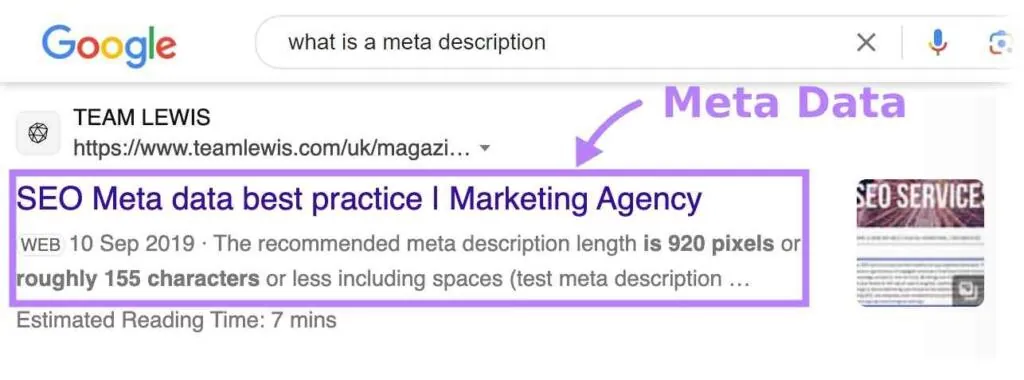
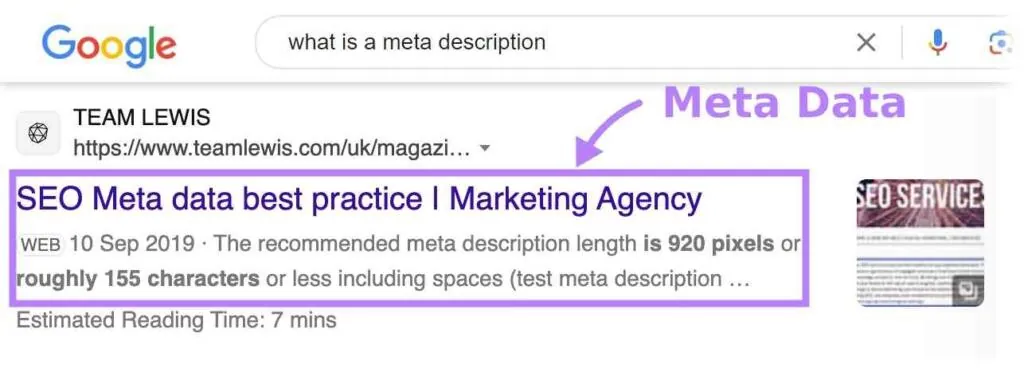
An SEO meta title is an HTML tag in the <head> section that defines a webpage's headline for search engines and browser tabs. It typically displays between 50 and 60 characters in results and serves as the primary factor determining whether someone clicks your link.
Matching user intent rather than stuffing keywords is the single biggest factor deciding success for an SEO meta title. If your title promises a guide but delivers a product page, bounce rates climb and rankings drop regardless of perfect optimization or technical perfection.
Writing Effective Page Titles
Creating strong titles requires balancing keyword placement with genuine clarity about page content. Each step below builds toward a title that satisfies both search engines and real people scanning results quickly. Skip any step and you risk either invisible pages or misleading snippets that damage trust over time.
-
Identify the primary search query your page answers before writing anything else. Use this exact phrase near the beginning of your title tag, keeping it within the first 30 characters when possible for maximum visibility on mobile devices.
Tip: Don't guess at keywords; check your existing analytics or search console data to see what queries already bring impressions to similar pages. -
Add a secondary descriptor or value proposition after the main keyword to differentiate from competitors. Keep the total length under 60 characters to prevent truncation in search results, counting spaces and punctuation as part of this limit.
-
Include your brand name at the end unless it's essential to the query itself. Separate it with a pipe symbol (|) or hyphen (-) for clean visual separation that doesn't waste precious character space on unnecessary words.
-
Write unique titles for every single page on your site without exception. Duplicate titles confuse search engines about which page should rank for specific queries and dilute your ability to target distinct topics effectively across your domain.
-
Test how your title appears using a SERP preview tool before publishing changes. These tools show pixel-width rendering rather than just character counts, revealing truncation issues that raw character limits can't predict accurately.
Tip: Preview on both desktop and mobile widths since Google displays different amounts of text depending on device type and screen resolution. -
Avoid keyword stuffing or repetitive phrasing that sounds unnatural when read aloud. If you wouldn't say the title in conversation, rewrite it until it flows naturally while still containing your target terms in logical positions.
-
Update titles quarterly based on performance data showing declining click-through rates. Stale titles lose relevance as search behavior shifts seasonally or as new competitors enter your space with fresher messaging approaches.
Meta Title Length Guidelines
Character limits aren't fixed numbers but pixel-width constraints that vary by device and language. The table below shows realistic ranges based on current display standards, though testing your specific titles remains essential since width depends on letter combinations used.
| Situation | Safe Length | What Changes It | What to Watch For |
|---|---|---|---|
| Desktop English | 50-60 chars | Wide letters (W, M) reduce space | Truncation after 580 pixels |
| Mobile English | 45-55 chars | Smaller viewport width | Ellipsis appearing mid-word |
| Non-Latin Scripts | 30-40 chars | Character encoding width | Earlier cutoff points |
| Brand-Heavy Titles | 40-50 chars | Long company names consume space | Keyword getting cut off |
| Question-Based Titles | 55-65 chars | Short words fit more easily | Full question displaying completely |
If your title consistently truncates despite following these ranges, use a pixel-measuring preview tool to identify which specific words push you over the visible limit. Adjusting word choice matters more than hitting an arbitrary character count since narrow letters like "i" and "l" take less space than wide ones.
Confirming Your Title Displays Correctly
Visual confirmation beats assumptions every time since rendering varies across browsers and devices. Check your live search appearance by searching your exact target query in an incognito window to see unpersonalized results matching what strangers encounter. The title should display fully without ellipsis (...) Cutting off critical information users need to decide whether to click.
Google Search Console provides direct feedback through its Performance report showing actual impressions and average position for each page. Pages with high impressions but low click-through rates often have titles that don't match searcher expectations despite ranking well technically. Compare your CTR against position benchmarks to identify titles needing revision even when they follow all formatting rules correctly.
Third-party SERP simulators let you preview changes before publishing, catching truncation issues that character counters miss entirely. These tools measure pixel width rather than guessing at character limits, giving accurate previews across multiple device types simultaneously. Always verify simulator predictions against live results after publishing since Google occasionally adjusts display parameters without announcement.
Common Meta Title Errors
Keyword stuffing crammed together: Cramming multiple variations like "best cheap affordable budget shoes" reads as spam and triggers quality filters that suppress rankings. Write one natural phrase incorporating your primary term instead of listing synonyms that no human would actually type or read willingly.
Missing or duplicate titles across pages: Search engines struggle to differentiate pages sharing identical titles, causing them to compete against each other and dilute ranking potential. Audit your site regularly using crawling tools to catch duplicates early and ensure every page has a distinct, descriptive title reflecting its unique content purpose.
Titles exceeding pixel width limits: Overlong titles get truncated with ellipsis, hiding crucial information and reducing click-through rates significantly compared to fully visible alternatives. Measure using pixel-based preview tools rather than relying on character counts alone since font rendering determines actual visible space available in search results.
Ignoring search intent alignment: Ranking for informational queries with transactional titles (or vice versa) creates mismatched expectations that increase bounce rates and signal poor relevance to algorithms. Study the top-ranking pages for your target query to understand whether searchers want guides, products, comparisons, or local services before crafting your title approach.
Frequently asked questions
Can I use emojis in meta titles?
No, Google typically strips emojis from search result titles and may flag pages using them as low-quality. Stick to standard alphanumeric characters and basic punctuation marks that render consistently across all devices and languages. Emojis might display in browser tabs but won't help your search visibility and could hurt credibility with users expecting professional results.
Why does Google rewrite my title?
Google rewrites titles when it determines your version doesn't adequately match the specific query or violates quality guidelines. This happens frequently for overly long titles, keyword-stuffed phrases, or pages where the H1 heading better describes content than the meta title itself. Improve your original title's relevance and clarity to reduce automatic rewriting frequency over time.
How often should I update meta titles?
Review and update titles quarterly based on performance metrics showing declining click-through rates or shifting search trends. Seasonal businesses may need monthly adjustments during peak periods while evergreen content might only require annual refreshes. Monitor Search Console data continuously to identify underperforming pages needing immediate attention rather than waiting for scheduled review cycles.
Is the meta title the same as H1?
No, the meta title exists only in HTML head code for search engines while H1 appears visibly on the page for readers. They should be related and topically consistent but don't need identical wording since they serve different audiences and contexts. Using slightly different phrasing allows you to optimize each element for its specific purpose without redundant repetition.
What happens if I leave the title tag empty?
Search engines will auto-generate a title from page content, anchor text linking to your page, or Open Graph metadata instead. Auto-generated titles rarely match user intent as precisely as carefully crafted ones and often perform worse in click-through rates. Always provide explicit title tags to maintain control over how your pages appear in search results and social shares.
Do meta titles directly affect rankings?
Yes, titles remain a confirmed ranking factor because they signal topical relevance and influence click-through behavior that feeds back into ranking algorithms. However, their impact diminishes if the page content doesn't deliver on the title's promise or if competing pages offer superior comprehensive coverage. Treat titles as entry points to quality content rather than standalone ranking solutions.
Can I use special characters in titles?
Basic punctuation like pipes, hyphens, colons, and parentheses display reliably across all platforms and are safe to use strategically. Avoid trademark symbols, currency signs, or decorative characters that may render inconsistently or trigger spam filters depending on context and region.
Conclusion
Your headlines won’t improve overnight, so don't get discouraged. Start by reviewing your top pages this week to see what’s working. You’ll quickly spot patterns that attract more visitors, and small tweaks will make a real difference in how people find and trust your content.
Comments (2)
Leave a Comment